
A content automation workflow sounds simple until the queue starts filling with drafts nobody trusts, approvals happen in Slack, and the newsletter operator is fixing metadata five minutes before send time.
Teams think the problem is producing more content. The real problem is controlling the path from idea to published asset without turning every article, newsletter, and social post into a one-off rescue mission.
AI made draft generation cheaper. It did not make editorial judgment, factual review, brand fit, compliance, distribution, or measurement disappear. That changes the conversation. The practical question is not whether your team can automate content. It is whether your team can build a workflow where automation speeds up the right steps and humans still own the decisions that matter.
In 2026, a serious content automation workflow is less like a prompt library and more like a publishing operations system: inputs, states, review lanes, quality gates, version history, approvals, distribution, and feedback loops.
Table of contents
- Content automation workflow is an operating model, not a tool
- Map the content lifecycle before you automate it
- The content automation workflow is a state machine
- Build human review lanes into the system
- Automate inputs without automating assumptions
- Design approvals, versioning, and publishing controls
- Connect distribution and measurement to the workflow
- Common failure modes in content automation workflow design
- Implementation sequence for a practical content automation workflow
- Where bl0ggers.com fits in the workflow
Content automation workflow is an operating model, not a tool
Why more drafts create more operational drag
Most teams start with a narrow goal: generate more article drafts, newsletter issues, podcast summaries, landing page copy, or social snippets. That is understandable. Drafting is visible, expensive, and easy to benchmark against a blank page.
The mistake teams make is treating draft generation as the whole publishing problem. Once output volume increases, the hidden work becomes louder:
- Who checks the source material?
- Who decides whether the piece fits the brand?
- Who confirms the target reader and distribution channel?
- Who owns edits after AI output changes the structure?
- Who approves publication?
- Who updates the content after performance data arrives?
If those steps are not modeled, automation creates a larger pile of unfinished work. A useful way to think about it is that AI increases supply. Workflow determines whether supply becomes published, trusted, measurable content.
Practical rule: Never automate draft volume until you know who owns review, approval, publishing, and post-publication maintenance.
The workflow view changes ownership
A content automation workflow forces the team to define ownership at each step. This matters because content operations often sit between marketing, editorial, product, SEO, leadership, and sometimes legal.
A creator-led newsletter may only need one human reviewer. A publisher running multiple verticals may need persona routing, fact checks, image approval, headline testing, and channel-specific packaging. A B2B content team may need sales alignment, product accuracy, and compliance review.
The workflow view makes these differences explicit. Instead of asking which AI writing tool is best, the team asks: where does automation help, where does human judgment sit, and what state must an asset be in before it can move forward?
Related reading from our network: teams thinking about visibility in answer engines face a similar architecture problem, where publishing is only useful if the content can be structured, found, and audited; see AI articles in 2026.
Map the content lifecycle before you automate it
Start with states, not tasks
Tasks are fragile. States are operational.
A task says: write draft. A state says: draft generated, awaiting editorial review. That difference matters because states let you route work, measure delays, and prevent premature publishing.
A practical content lifecycle might look like this:
| State | Owner | Automation role | Human decision |
|---|---|---|---|
| Idea captured | Marketing or creator | Cluster topics and detect duplicates | Is this worth producing? |
| Brief approved | Editor | Generate outline and source checklist | Does the angle fit the audience? |
| Draft generated | AI system | Produce first version | Is it usable? |
| Editorial review | Editor | Suggest fixes and tighten structure | Does it say the right thing? |
| Fact review | Specialist | Flag claims and missing citations | Is it accurate enough to publish? |
| Distribution ready | Operator | Format for blog, newsletter, and social | Is each channel package correct? |
| Published | CMS or platform | Push live and trigger webhooks | Should it be live now? |
| Measured | Ops or growth | Pull performance data | What should change next? |
The table is not universal. That is the point. Your workflow should reflect how your team publishes, not how a vendor demo looks.
Define handoffs and decision rights
What breaks in practice is not usually the AI output. It is the handoff.
An editor thinks the SEO owner approved the brief. The SEO owner thinks the newsletter operator will rewrite the intro. The newsletter operator thinks the creator already reviewed the claims. Nobody is wrong, but the workflow is unclear.
Decision rights should be explicit:
- The editor can request a rewrite.
- The subject-matter reviewer can block publication for factual issues.
- The brand owner can change voice guidance but cannot silently rewrite technical claims.
- The distribution operator can adjust formatting without reopening editorial review.
- The publisher can schedule or pause publication.
If this feels heavy, start with only three approval states: needs edit, approved to publish, blocked. Then add nuance when bottlenecks appear.
The content automation workflow is a state machine

Pipeline thinking fails under review pressure
Many teams draw their content process as a straight line: idea, brief, draft, edit, approve, publish. That works on a whiteboard. It fails when real content needs to move backward.
A draft may fail factual review and return to research. A strong article may pass editorial review but need a new headline package for email. A founder may approve a post but ask to hold it until after a product release. A newsletter issue may need to ship while the long-form blog version waits for additional examples.
Linear pipelines hide these realities. They make exceptions look like chaos. A state machine makes them normal.
A state machine says every asset has a current status, allowed transitions, owners, and rules. For example:
- Draft generated can move to editorial review.
- Editorial review can move to fact review, revision requested, or rejected.
- Approved can move to scheduled, published, or held.
- Published can move to update requested.
That changes the conversation because you stop arguing about whether the process is broken every time a piece moves backward. Movement is part of the system.
State machines make exceptions visible
Exceptions are where content automation either becomes useful or dangerous.
If a draft includes an unsupported claim, the workflow should not rely on someone remembering to mention it in a comment thread. The asset should move into a blocked or research needed state with a reason code.
Reason codes sound bureaucratic until you need to measure why content is stuck. Are drafts blocked because of poor prompts, weak briefs, missing sources, legal concerns, or unclear positioning? Each cause requires a different fix.
Practical rule: If a content asset can be blocked, returned, or held, model that as a state. Do not hide it in comments.
A simple comparison helps:
| Approach | Looks efficient | Breaks when | Better use case |
|---|---|---|---|
| Linear checklist | Yes | Work loops back or approvals conflict | Tiny teams with low risk |
| Kanban board | Sometimes | Automation needs rule-based routing | Lightweight manual ops |
| State machine | Less flashy | Poorly designed states multiply | Scaled AI publishing with review gates |
| Fully automated posting | Very | Accuracy, brand, or timing matter | Low-risk feeds or internal drafts |
The mistake teams make is trying to jump from manual docs to fully automated posting. The safer path is stateful automation: let the system move work, but require explicit gates where judgment matters. For a deeper adjacent breakdown, the bl0ggers.com guide to automated blog posting platform architecture covers how review gates and publishing controls fit into a platform model.
Build human review lanes into the system
Separate editorial, factual, and brand review
Human review is often treated as one checkbox. That is too vague.
Editorial review asks whether the piece is clear, structured, useful, and appropriate for the reader. Factual review asks whether claims are accurate and supported. Brand review asks whether the voice, positioning, and risk profile fit the publisher.
One person may perform all three reviews in a small team. The workflow should still distinguish them. Otherwise, every reviewer becomes a bottleneck for every kind of problem.
For example:
- A creator may own voice and point of view.
- A managing editor may own structure and readability.
- A product marketer may own product claims.
- A legal or compliance reviewer may only see regulated topics.
This is where human-in-the-loop AI publishing becomes practical instead of philosophical. The workflow decides when humans enter, what they are checking, and what authority they have. If your team is still designing that model, the prior bl0ggers.com article on human-in-the-loop AI publishing workflow architecture is a useful companion to this implementation view.
Use gates only where judgment matters
Not every step needs approval. Too many gates turn automation into a waiting room.
Use hard gates for:
- Claims about products, prices, policies, security, health, finance, or legal matters.
- Content published under a founder, executive, expert, or named creator.
- Pieces that mention customers, partners, competitors, or market comparisons.
- High-visibility assets such as homepage copy, flagship newsletters, or sponsored posts.
Use soft checks for:
- Formatting issues.
- Internal linking suggestions.
- SEO title length.
- Missing alt text.
- UTM parameters.
- Social snippets.
A soft check can create a warning without blocking publication. A hard gate should stop the asset until someone resolves it.
Practical rule: Gate risk, not taste. If every preference blocks publishing, the workflow will be bypassed.
Related reading from our network: security teams run into the same automation trap when they add agents before they define ownership and escalation paths; the SOC version of this problem is covered in AI agents in security operations.
Automate inputs without automating assumptions
Briefs are control surfaces
A weak brief produces expensive review work. A strong brief narrows the decision space before AI writes anything.
For content automation, the brief is not a creative formality. It is a control surface for the workflow. It should define:
- Target reader.
- Search or audience intent.
- Content type.
- Primary angle.
- Required sources or source boundaries.
- Claims to avoid.
- Brand voice constraints.
- Internal links to consider.
- Distribution channels.
- Required reviewers.
The practical question is how much structure you need. A solo creator may need five fields. A publisher managing multiple sites may need twenty. The right amount is enough to prevent rework without making brief creation slower than drafting.
AI can help generate briefs from topic clusters, customer questions, transcripts, research notes, or keyword lists. But the assumptions should be visible. If the system infers that the target reader is a CMO, the editor should see that assumption before the draft is generated.
Research needs provenance
AI-generated research summaries are useful. They are also dangerous when nobody can trace where a claim came from.
A content automation workflow should preserve provenance. At minimum, that means the asset record should show:
- Source documents used.
- URLs or uploaded files referenced.
- Transcript segments or notes included.
- Date the research was captured.
- Claims flagged as uncertain.
- Reviewer comments on disputed points.
This does not mean every sentence needs a footnote. It means the review team should not have to reverse-engineer the origin of a claim after the draft exists.
A good workflow also separates source ingestion from writing. First, collect and approve the source pack. Then generate the brief or draft. If the source pack changes, the asset should record that change.
Design approvals, versioning, and publishing controls
Approval is a state, not a message
Approvals often happen in Slack, email, comments, voice notes, or a quick yes from the founder. That works until someone needs to know which version was approved.
In a real content automation workflow, approval should be stored against the asset and version. The system should know:
- Who approved it.
- What they approved.
- When they approved it.
- Which channel it was approved for.
- Whether approval expires after changes.
If an editor approves the blog article, that does not necessarily approve the newsletter subject line. If a product marketer approves a technical claim, that does not mean the brand headline is approved. Granularity matters.
What breaks in practice is silent mutation. A piece is approved, then someone changes the intro, swaps the CTA, or adds a claim during formatting. The published version is no longer the approved version.
Version history protects the team
Version history is not just for rollback. It protects trust.
When teams use AI heavily, text can change quickly. An editor may request a rewrite and get a substantially different piece. A reviewer may fix one claim and accidentally alter another. A distribution operator may shorten a newsletter and remove necessary context.
Version history should make these changes visible without forcing everyone into a complex developer-style diff. Useful fields include:
- Version number.
- Change reason.
- Changed by.
- AI-generated or human-edited flag.
- Approval status.
- Reviewer notes.
For some teams, this can live in a CMS. For others, it requires a workflow layer above the CMS. The important part is that publishing controls are not reduced to a final button.
Connect distribution and measurement to the workflow
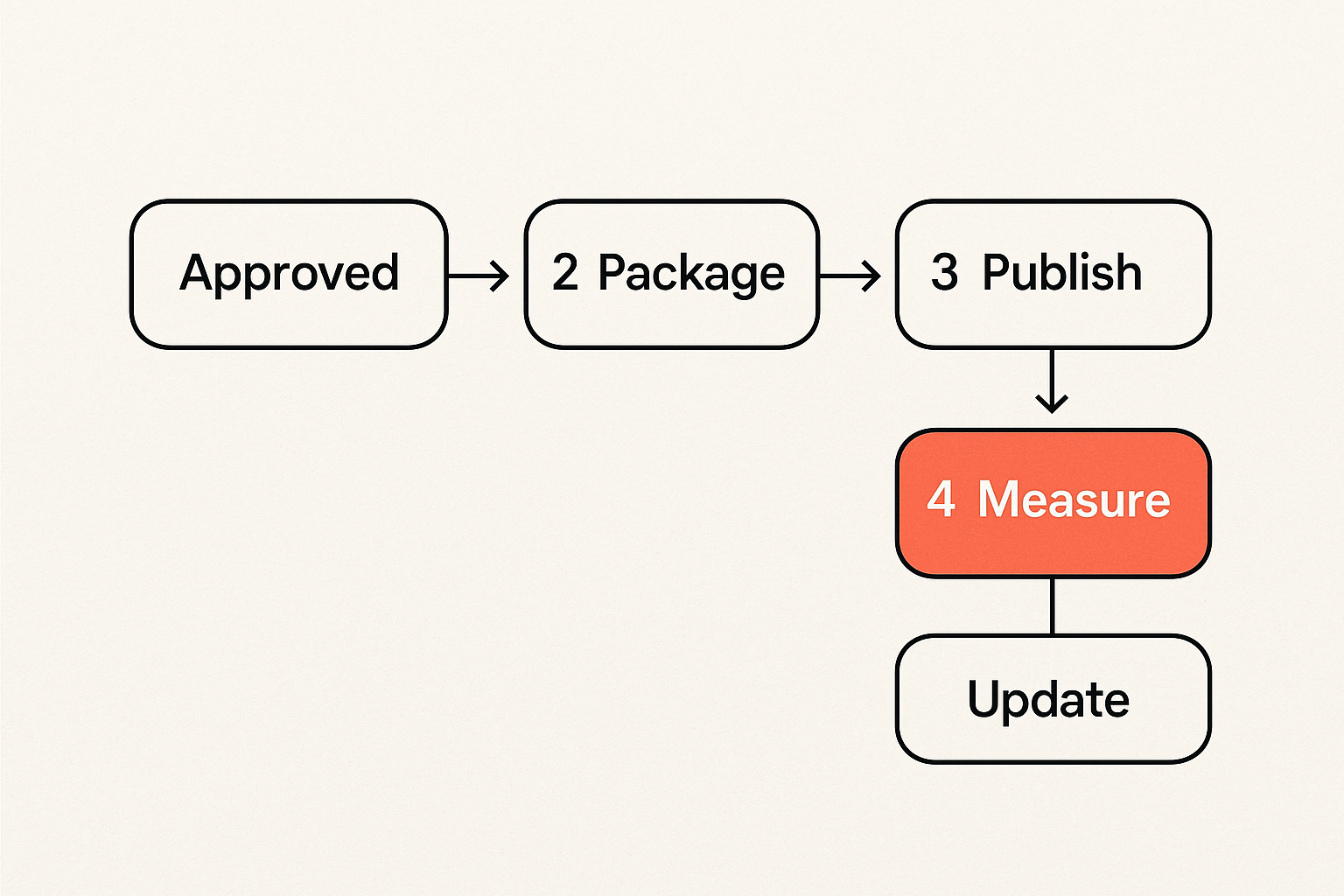
Publishing is not the finish line
Publishing is a state transition, not the end of work.
A single asset may become a blog post, newsletter segment, podcast script, LinkedIn post, short video outline, and internal enablement note. If distribution is bolted on after approval, operators spend time copying, reformatting, and checking details across tools.
The workflow should define channel packages before publication:
- Blog title, slug, meta description, excerpt, tags, and canonical settings.
- Newsletter subject line, preview text, intro, and send segment.
- Social captions, images, and tracking links.
- Podcast intro, episode notes, and transcript handling.
- Webhook events for downstream systems.
This is where UI-only automation disappoints. A nice editor screen does not solve state, trust, scheduling, channel packaging, or support. The real work is making sure the right version reaches the right channel with the right metadata at the right time.
Measure bottlenecks as well as outcomes
Most teams measure content after it ships: traffic, opens, clicks, conversions, rankings, subscribers, pipeline, or revenue contribution. Those matter. But workflow metrics explain why output is slow or quality is uneven.
Track operational metrics such as:
- Time from idea to approved brief.
- Time from brief to draft.
- Time waiting in editorial review.
- Percentage of drafts returned for rewrite.
- Percentage blocked for factual review.
- Average number of revisions before approval.
- Publication delay after approval.
- Update requests after publication.
These numbers do not need to become a dashboard circus. They help operators see where the system is actually constrained.
Related reading from our network: the same principle shows up in billing operations, where teams often choose software by the screen but live or die by approvals, reconciliation, and month-end workflow; see this guide to invoicing software workflow.
Common failure modes in content automation workflow design
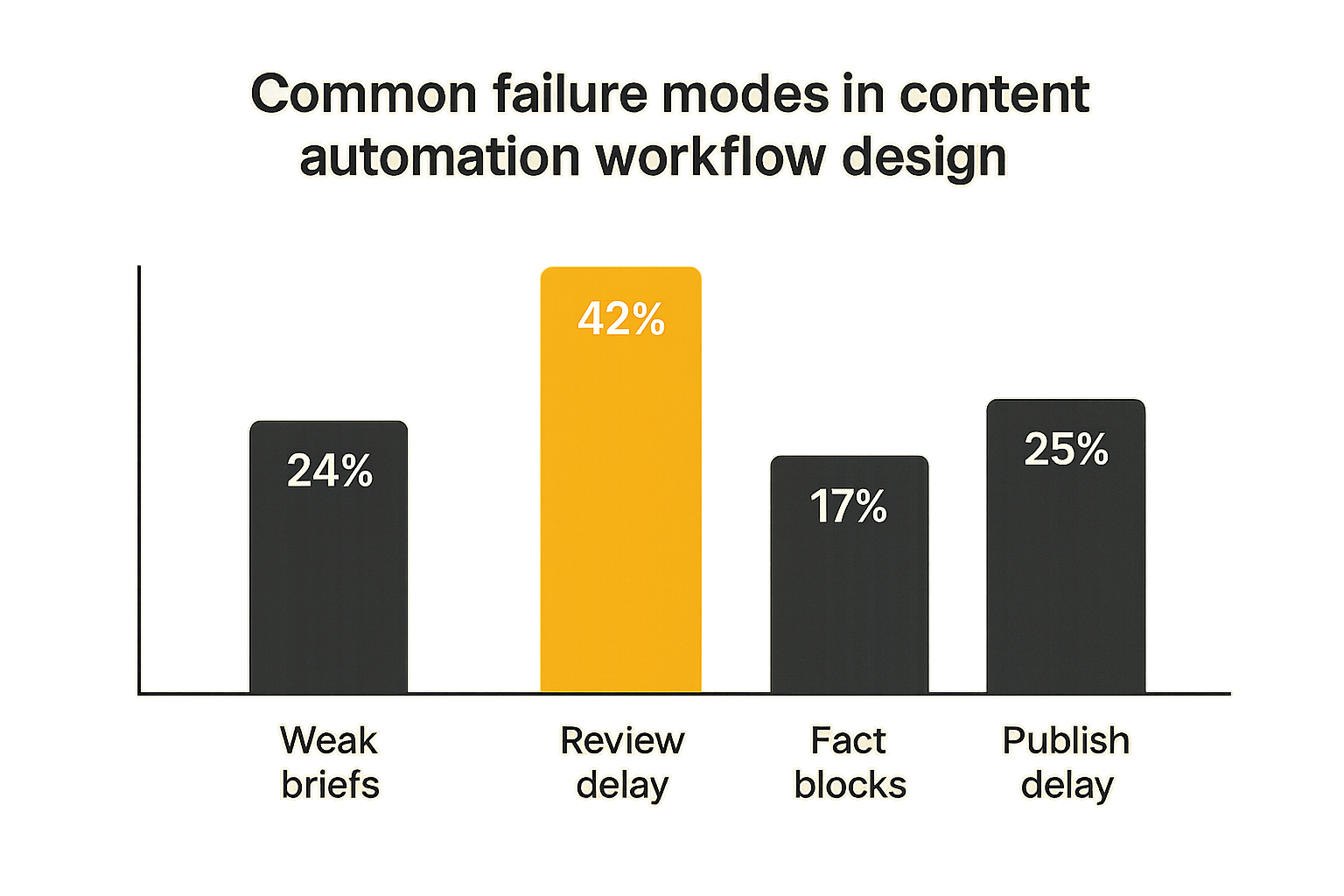
What fails in production
The common failure modes are predictable.
First, teams automate generation before they standardize briefs. The result is inconsistent drafts that require heavy editing. The AI looks unreliable, but the real problem is that the input changes every time.
Second, they put one generic human review step near the end. This creates a bottleneck where every problem arrives late: weak angle, unsupported claims, wrong audience, bad structure, missing internal links, and distribution gaps.
Third, they treat the CMS as the workflow. A CMS can publish content, but many CMS setups are poor at review routing, source provenance, multi-channel packaging, and state transitions.
Fourth, they use automation to hide uncertainty. The system generates confident copy from weak sources. Reviewers skim because the page looks polished. Bad claims slip through because the workflow never exposed uncertainty.
Fifth, they do not assign ownership for updates. Content decays, product details change, links break, and answer formats evolve. If published content has no maintenance state, the archive becomes a liability.
What works instead
What works is boring and operational:
- Standardize briefs before scaling generation.
- Separate review lanes by risk and expertise.
- Store approval against versions.
- Keep source packs attached to assets.
- Use reason codes for blocked work.
- Trigger distribution from approved channel packages.
- Measure workflow bottlenecks, not just traffic.
- Maintain published content with refresh states.
A useful pattern is to start with one content type, one audience, and one distribution channel. Build the workflow there. Then add variations.
For example, start with weekly newsletter-to-blog publishing. Define the brief, AI draft, editorial review, approval, blog formatting, newsletter formatting, publish event, and measurement loop. Once that works, add podcast repurposing or social snippets.
Practical rule: Scale the workflow after it survives one repeatable publishing loop. Do not design for every future channel on day one.
Implementation sequence for a practical content automation workflow
A five-step rollout
A practical rollout should reduce ambiguity before it increases automation. Here is a sequence that works for many content teams, creators, and publishers:
- Inventory the current process. List every place content work happens: docs, CMS, Slack, email, spreadsheets, AI tools, design tools, newsletter platforms, podcast tools, and analytics dashboards. Identify where state is currently hidden.
- Define the minimum state model. Start with idea, brief approved, draft generated, in review, revision requested, approved, scheduled, published, and update requested. Add blocked only if you will capture reasons.
- Create review lanes. Decide which content needs editorial, factual, brand, legal, product, or creator review. Define who can approve, request changes, or block.
- Automate controlled steps. Generate outlines, drafts, summaries, metadata, snippets, and channel packages from approved inputs. Do not allow automation to skip required states.
- Instrument the workflow. Track time in state, revision count, block reasons, publication delay, and post-publication update requests. Use this to improve prompts, briefs, and routing.
This approach is slower than connecting an AI writer directly to a CMS. It is also less likely to create cleanup work that erases the productivity gain.
Example workflow configuration
You do not need complex code to design the model. Even a lightweight configuration can clarify the system.
content_type: long_form_article
states:
  - idea_captured
  - brief_approved
  - source_pack_ready
  - draft_generated
  - editorial_review
  - factual_review
  - channel_packaging
  - approved_to_publish
  - scheduled
  - published
  - update_requested
required_gates:
  editorial_review:
    owner: managing_editor
    can_block: true
  factual_review:
    owner: subject_matter_reviewer
    required_when:
      - contains_product_claims
      - cites_external_research
  channel_packaging:
    owner: publishing_operator
    checks:
      - slug
      - meta_description
      - newsletter_subject
      - social_caption
transitions:
  draft_generated:
    allow:
      - editorial_review
      - revision_requested
  approved_to_publish:
    allow:
      - scheduled
      - held
  published:
    allow:
      - update_requested
The value is not the YAML. The value is forcing the team to name the states and gates. Once the model is clear, tooling decisions become easier.
Where bl0ggers.com fits in the workflow
Use AI for throughput and humans for control
bl0ggers.com is built around a simple premise: AI should increase publishing output without removing editorial control. That means the product fit is not just generate an article. It is workflow support for teams that need review queues, persona-led publishing, generated article integrations, podcast and newsletter workflows, subdomain publishing, and webhook-based automation.
For a content team, that can mean turning research into blog drafts while keeping human approval in the loop. For a newsletter operator, it can mean generating recurring issue components while preserving final editorial review. For a publisher, it can mean running multiple persona or topic streams without pretending every piece should bypass humans.
The practical fit is strongest when your team already knows that content volume is not the only constraint. If you need review lanes, quality gates, approvals, distribution states, and measurement, then the workflow layer matters as much as the AI model.
A content automation workflow should not ask you to choose between speed and control. It should make the tradeoff explicit: automate repeatable work, expose uncertainty, route judgment to the right person, and publish only when the asset is ready.
Try bl0ggers.com
You are writing for content teams, creators, and publishers who want to use AI to increase output without giving up editorial control. Build a content automation workflow that treats publishing as a controlled system, not a pile of drafts. Try bl0ggers.com.